The Engineer's Personal Assistant
Chapters
The highest-leverage use of AI for senior engineers is not writing more code faster. It is building an execution bridge that absorbs glue work without taking the engineer out of the technical loop.
Note: I received a lot of feedback on this post. The ideas resonated, but readers also asked for more practical guidance, so I’ve updated the blog post with practical takes. The ideas described here are now available in the public KeyClaude repository. You can fork it, adapt the workflows to your own tools and habits, and use it as a starting point for building your personal execution layer.
At 9:07 on a Tuesday morning, an engineer opens a Slack thread asking a deceptively simple question:
Are we still comfortable with this design, or did the latest findings change the plan?
The answer is not in Slack. It is in a Jira, GitHub PR, a half-finished design document, a slack comment from last week, and a conversation 1:1 note with the engineer vaguely remembers having with another team.
Thirty minutes later, you have found the context. Another twenty minutes go into writing a reply that is accurate, diplomatic, and clear enough that nobody interprets it as a commitment the team did not make.
The actual technical solution takes two minutes. That is all you need to make a call - the rest? The rest is glue work, copy paste, 1000 tabs in your browser and 5 different AI agents running different POCs. This is not an unusual failure of productivity. It is a normal senior engineering day.
We tend to describe this work as “communication overhead,” as if it were separate from engineering. It is not. It is the work of carrying context across boundaries, finding the missing assumption, unblocking another person, turning a rough idea into a decision, and making sure the decision survives contact with the rest of the organization.
The code is often the visible part. The glue is what makes the code useful.
Senior Engineering Is… a Glue Job
Tanya Reilly in her staff engineering books and blog often calls this work glue: the activities that connect people, systems, decisions, and unfinished threads. Her examples include noticing when someone is blocked, reviewing design documents, improving onboarding, finding gaps between teams, and making sure important work does not quietly disappear. She makes a crucial distinction: glue work is technical leadership, not merely administration.
Similarly one of the best staff engineering references I read from Will Larson makes a related point about Staff-plus engineering — with more time spent on strategy, relationships, technical quality, mentorship, and organizational alignment. The feedback loop is slower than a coding session, but the impact can be broader.
That creates a strange career and productivity problem. The more senior you become, the more of this connective work you inherit. But the tools around you are usually optimized for either writing code or communicating in generic streams of messages. They do not help much with the space between those activities: assembling the right context, choosing the right audience, and closing the loop without losing half a day.
This is where AI becomes interesting — not as a replacement engineer, but as a personal execution layer.
The Chat Window Is Not the Assistant
The industry often frames AI access as a model problem: Which model is smartest? Which prompt is most precise? Which agent can use the most tools?
For day-to-day engineering work, the more important question is often simpler:
How many steps are between noticing friction and triggering help?
A separate chat tab sounds close. In practice, it can mean stopping the task, opening a browser, reconstructing the context, pasting text, waiting for an answer, rewriting/validating and copying the result, and returning to the original workflow. The assistant is technically available, but operationally distant.
That distance matters because engineers do not work in neat, isolated sessions. They move between maker work and manager work all day: code, design review, Slack, planning, mentoring, incident context, and back to code. Paul Graham’s distinction between maker and manager schedules remains useful here. Programming and writing need longer blocks — a single interruption can turn an afternoon into two fragments that are each too small for difficult work.
Cal Newport extends the same argument to modern communication: constant messaging and inbox checking can be as disruptive to makers as meetings. The interruption is not just the time spent answering. It is the cost of re-entering the original problem.
This changes how we should evaluate AI tooling.
A clever prompt in a distant interface may be less valuable than a modest skill available at the exact moment a message, decision, or note is being created.
Distance to trigger often matters more than cleverness of the prompt.
The Execution Bridge
I think about this as an execution bridge: a small layer between the messy inputs of engineering work and the actions that move the work forward.

The bridge has three parts.
1. Audit Friction Before Adding Automation
Start with the annoyances that repeat.
Not the spectacular tasks. The tiny ones:
- polishing the same kind of status update
- looking up the same project context before replying
- turning a meeting into a list of follow-ups
- finding the thread where a decision was made
- remembering to capture an important piece of feedback
- rebuilding a weekly summary from scattered notes
These tasks are easy to dismiss because each one is small. That is exactly why they are good candidates for a friction audit. A five-minute interruption repeated ten times a week is not a minor inconvenience. It is a system boundary asking to be redesigned.
The useful question is not “Can AI do this?” It is:
What part of this task is judgment, and what part is repeated context assembly?
Keep the judgment. Automate the assembly.
2. Invest in the Tools, Not Only the AI Chatbot
A useful assistant should fit the places where work already happens.
The goal is not to scatter more AI across more applications. It is to create a structured context layer that brings signals from those applications into one durable documentation space. Whether you are driving an important task, shaping an engineering vision, or helping colleagues build their own systems, the pattern is the same: capture the right context, make actions explicit, fetch relevant information when needed, and turn the result into a clear message or reusable artifact.
The assistant becomes valuable when it helps you move from fragmented inputs to consistent execution.
Content added September 15, 2026: Feedback on this post made me implement an example of this workflow. KeyClaude — a small, public assistant layer built around the way engineers already work. You can browse the repository, fork it, and adapt the workflows to your own tools and habits.
KeyClaude is deliberately keyboard-first. Its basic interaction is not “go ask an assistant for help.” It is “select text, hit a key, and get a transformed result back.” The repository describes system-level shortcuts and Raycast actions so the result can be used from the application where the work is already happening.
I have included a couple examples that support different modes of communication following the readers’ empathy. For example, a default rewrite for everyday internal messages, an outcome-first mode for leadership updates, etc. The point is not to make every message sound polished or AI fixing your grammar. It is to make the intended audience and action easier to see. KeyClaude’s example slide deck shows this pattern in practice.
Enrich the message before writing it
A rewrite is useful when the assistant understands more than the words currently selected. KeyClaude skills can enrich a task with context from sources such as GitHub and Slack before producing an answer. That turns the workflow from “polish this sentence” into “help me respond with the relevant context already assembled.” When testing KeyClaude, I rarely saw benefit of “improving style” but I saw a large productivity boost of using it to piece relevant links together via MCP interactions. All I needed was to leave TODO in my messages and AI assistants understood and fixed them with relevant context.
The engineer still decides what is true and what should be said. The assistant reduces the repeated lookup work that happens before the decision can be expressed.
Turn small interactions into durable records
The same layer can capture a task from a Slack thread, record an action signal after a one-to-one, analyze leadership feedback, or create and review a weekly note. These are deliberately narrow workflows. Each one turns a fleeting interaction into an artifact that can be revisited later instead of relying on memory or a long conversation history.
This is where a personal assistant starts to become an operating system: not because it runs everything, but because important context stops evaporating.
Keep the engine separate from personal context
KeyClaude also uses a useful two-repository split. The public repository contains the reusable engine — skills, agents, scripts, and shortcuts — while a separate data directory stores personal weekly notes and work-specific context. That makes the mechanism shareable without pretending that everyone should share the same private data or working assumptions.
Consider a rough message to a teammate:
I looked at this and I think we should probably not do the migration yet because there are still some issues with the other service and I want to check a few things first.
The problem is not grammar. The problem is that the message hides the decision, the evidence, and the next action.
A leadership-oriented rewrite might become:
I recommend postponing the migration until we resolve the dependency issues in the other service. I found two open risks that could increase rollback effort. I’ll validate those assumptions today and propose a revised sequence afterward.
The assistant did not make the decision. It did not invent the risks. It helped preserve the engineer’s judgment while making the judgment easier for someone else to understand.
That distinction matters. The goal is not to outsource thinking. It is to reduce the tax paid for expressing and transmitting thought.
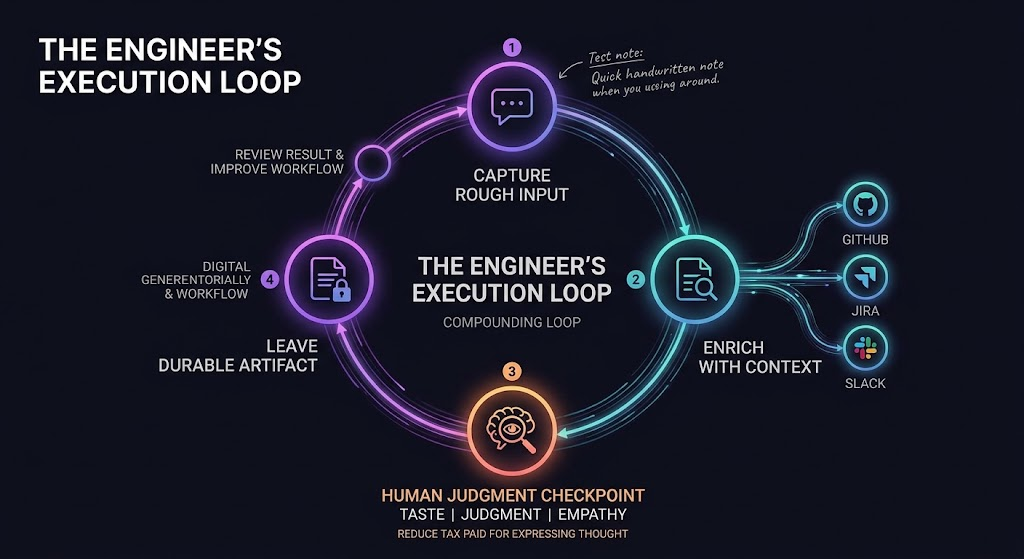
3. Turn Useful Actions Into Loops
A one-off prompt can save a few minutes. A loop can change how work behaves.
A practical loop might look like this:
- Capture the rough input while it is still available.
- Enrich it with the context needed to interpret it.
- Transform it into a useful artifact.
- Leave the artifact somewhere durable.
- Review the result and improve the workflow.
The artifact might be a rewritten message, a task with a link to the originating thread, a growth note, a design-review summary, or a weekly synthesis.
The important part is that the work does not disappear into a conversation history.
This is also why the small “coaching” features matter. KeyClaude’s writing workflow records recurring patterns instead of treating each rewrite as an isolated correction. The idea is simple: the assistant should not only improve the message in front of you — it should help you notice habits that weaken your writing over time.
That is a compounding loop:
- the message gets clearer
- the decision travels farther
- the pattern becomes visible
- the engineer improves their own writing, thus not needing to use AI anymore
- the next message needs less help
The most useful assistant is not the one that produces the most output or gives you ready-to-consume artifacts. It is the one that quietly improves the quality of the system around you when you need it and your shortcut convenience.
I used KeyClaude as an experiment and recommended it for teams and engineers I work with to assist them with day-to-day tasks.
The Assistant Should Not Be Trusted With the Whole Job
There is a failure mode on the other side of this argument: automating a task without reducing the responsibility to review it.
A badly designed assistant can turn five minutes of writing into twenty minutes of checking. It can produce a polished summary that omits the uncomfortable detail. It can make an uncertain decision sound final. It can create a second system whose outputs nobody maintains.
The right response is not to reject automation. It is to give it narrower responsibilities.
Ask the assistant to:
- find likely context, not declare the final truth
- draft a summary, not silently publish it
- identify missing assumptions, not approve the design
- suggest a next step, not change production systems
- create a report or reviewable artifact, not hide work inside an opaque loop
This is consistent with the broader direction of agentic tooling. GitHub’s description of Agentic Workflows emphasizes that AI can handle triage, documentation, reporting, and other subjective repetitive tasks inside familiar engineering surfaces — but also stresses permissions, sandboxing, reviewable outputs, and human approval.
The standard is not autonomy for its own sake. The standard is a better review loop.
What Changes When the Glue Gets Cheaper?
The most interesting result is not that an engineer sends messages faster. It is that more of the right work becomes economically possible.
An engineer can afford to capture the decision after the meeting instead of trusting memory. They can prepare a better answer before a cross-team discussion. They can turn a recurring interruption into a document or a utility. They can notice that the same confusion has appeared in three different threads and treat it as a design problem rather than three unrelated conversations.
The assistant makes these actions cheaper, but the engineer still supplies the most important ingredients:
- taste about what matters
- judgment about what is true
- empathy for the audience
- responsibility for the outcome
- willingness to remove automation that creates more burden than value
That is why the “personal assistant” framing is more useful than the “AI employee” framing.
An employee metaphor invites delegation: hand over a task and inspect the result. A personal assistant metaphor suggests continuity: understand my working context, help me prepare, remind me about open loops, and make the next decision easier.
The difference is subtle but important. Senior engineers do not mainly need another worker to whom they can throw isolated tickets. They need a low-friction layer that helps them remain effective while moving between technical depth and organizational breadth.
Build an AI Assistant Around the Way You Work
This kind of leverage is not tied to a particular title. It becomes useful whenever your work moves between technical depth, coordination, and communication.
In fact, the earlier you build a small version of one, the more useful it may become. Start with one recurring annoyance. Put the trigger where the work happens. Give the skill a narrow job. Make the output reviewable. Store the result somewhere durable. Then measure whether the loop actually reduces friction.
Do not begin by collecting every available AI skill. Begin by identifying the work that keeps falling between tools.
That is where the leverage is.
The future-facing version of engineering productivity is not an engineer surrounded by autonomous agents. It is an engineer with a well-designed execution bridge: close enough to use without breaking flow, connected enough to assemble relevant context, and constrained enough that ownership never becomes ambiguous.
The code still matters. But so does everything that lets the code become a decision, a collaboration, a launch, or a result.
A personal assistant is not a status symbol. It is a small piece of engineering applied to the way you work.